

HOW TO OUTLINE YOUR TEXT
Why should I outline my text?
Vectored text can be scaled infinitely without any loss of image quality. That means your text will appear smooth and crisp at any size or resolution and will print clearly on your trade show booth graphic. Also, it's possible to open and print your trade show display artwork correctly without needing the actual font file used.When submitting your trade show exhibit Artwork for print, one of the requirements is to outline your text otherwise the printer will reject it as a failsafe to ensure you have the best resolution for your booth graphics.
Note: Once text is outlined, it can no longer be changed / edited.
Click here to view all Artwork Guidelines
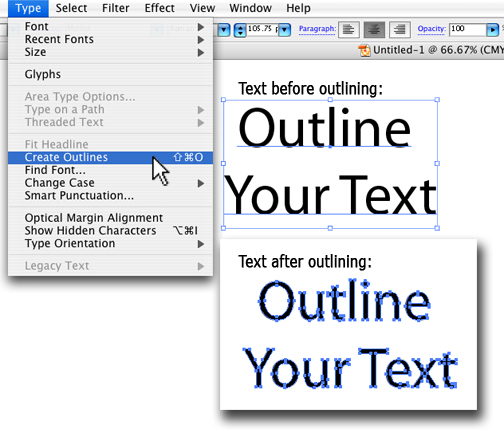
How to Outline Text Using Adobe Illustrator:
- Unlock all text layers
- Select all of the text (Mac: Cmd+A) (PC: Ctrl+A)
- From the "Type" menu, select "Create Outlines" (Mac: Shift+Cmd+O) (PC: Shift+Ctl+O)
- From the "File" Menu, select "Save As" and save your file as a new document
×
×
×
×
×
×
×
×
×
×
×
×